How KV works
Workers KV is a global, low-latency, key-value data store. It stores data in a small number of centralized data centers, then caches that data in Cloudflare’s data centers after access. KV supports exceptionally high read volumes with low latency, making it possible to build highly dynamic APIs and websites that respond as quickly as a cached static file would. While reads are periodically revalidated in the background, requests which are not in cache and need to hit the centralized back end can see high latencies.
Workers KV is free to try, with additional usage available as part of the Workers Bundled plan.
Learn more at the Workers KV API reference and take full advantage of Advanced Workers KV Topics guide to tune and design your application to take best advantage of the available features.
Write data to KV and read data from KV
When you write to KV, your data is written to central data stores. It is not sent automatically to every location’s cache, but regional tiers are notified within seconds to do a purge of that key.
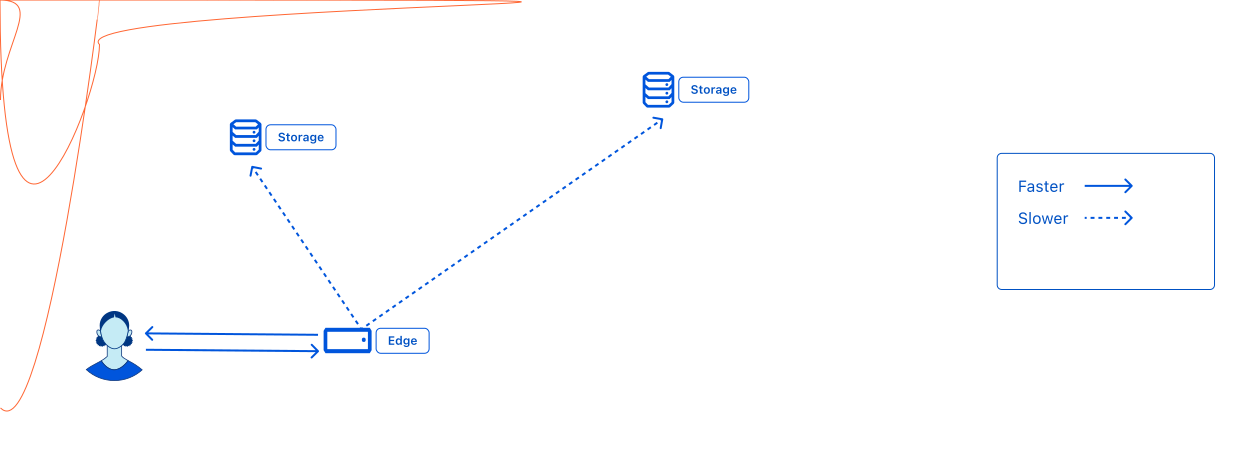
Initial reads from a location do not have a cached value. The data must be read from the nearest regional tier, followed by a central tier, degrading finally to the central store for a truly cold global read. So while the very first access is slow globally, subsequent requests are faster, especially if they’re concentrated in a single region.

Frequent reads from the same location return the cached value without reading from anywhere else, resulting in the fastest response times. Additionally, Workers KV operates diligently to keep the latest value in the cache by opportunistically refreshing from upper tiers and the central data stores in the background. This is done carefully so that assets that are being accessed continue to be kept served from the cache without any stalls.

Because Workers KV stores data centrally and uses a hybrid push/pull-based replication to store data in cache, it is generally good for use cases where you need to write relatively infrequently, but read quickly and frequently. It is optimized for these high-read applications, only reaching its full performance when data is being frequently read. Infrequently read values are pulled from other data centers or the central store, while more popular values are cached in the data centers they are requested from.
Performance
A little bit of tuning of your usage of Workers KV can result in significant performance gains. The single most
impactful way to improve performance is to increase the [cacheTtl](workers/learning/advanced-kv-guide#embrace long-cachettl)
parameter up from it’s default 60s. This and other techniques are described in detail in the Advanced Workers KV Topics guide
Consistency
KV achieves this performance by through caching which makes reads eventually-consistent with writes. Changes are usually immediately visible in the Cloudflare global network location at which they are made, but may take up to 60 seconds or more to be visible in other global network locations as their cached versions of the data time out or for them to see reads to trigger a refresh. Negative lookups indicating that the key doesn’t exist are also cached, so the same delay exists noticing a value is created as when a value is changed.
Workers KV is not currently ideal for situations where you need support for atomic operations or where values must be read and written in a single transaction.
If you need stronger consistency guarantees, consider using Durable Objects. Alternatively, if you are happy with the read behavior but need finer-grained guarantees about the behavior of concurrent writes into KV, that is described in the [advanced topic on concurrent writes](/workers/learning/advanced-kv-guide#concurrent-writers-to-a-single key).
KV does not perform like an in-memory datastore, such as Redis. Accessing KV values, even when locally cached, has significantly more latency than reading a value from memory within a Worker script.
Security
All values are encrypted at rest with 256-bit AES-GCM, and only decrypted by the process executing your Worker scripts or responding to your API requests.